Multi-tenant search, end to end: one ⌘K bar for every directory you run.
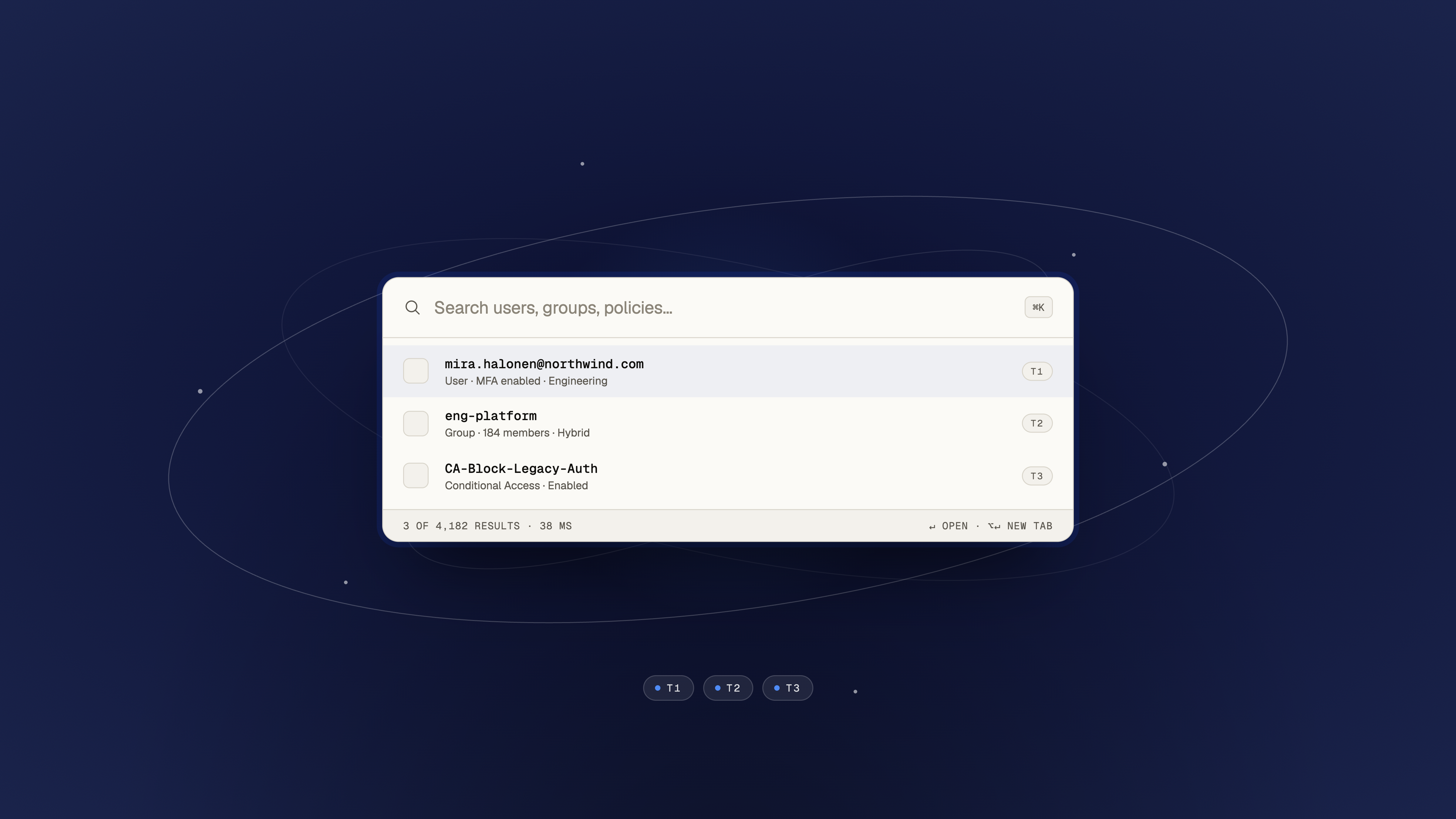
We shipped multi-tenant search so ⌘K resolves users, groups, and Conditional Access policies across every connected tenant in one pass. Filter to a single tenant when you want focus. Switch context with ⌘1 / ⌘2, not another round trip through the Entra portal.
The sign-out tax on every lookup
Acquisitions, regional splits, partner orgs. Almost every IT team we talk to runs more than one tenant. The portals were built for a single org at a time, so "global search" becomes a ritual: which blade, which tenant, which account am I signed in as right now?
That friction is invisible until you measure it. A helpdesk ticket with a UPN and no tenant ID costs five minutes before the first meaningful click. Multiply that across a desk that handles dozens of tickets a day.
Search should not start with "which portal am I in?" It should start with the object you are trying to find.
Tenants as first-class objects
In TenLens, a tenant is not a dropdown at the edge of the UI. It is a first-class object in the data model, the credential store, and the keyboard layer.
- Connect onceEach tenant connects once and stays signed in on your device. TenLens never holds your credentials on a server.
- Search wideBy default, ⌘K spans every connected tenant. Results show a tenant pill (T1, T2, …) so you always know where an object lives.
- Narrow fastPrefix with a tenant shortcut or pick T1 / T2 / T3 from the footer chips to scope the index without signing out.
What we index (and what we do not)
We index the objects operators actually hunt for: users, groups, administrative roles, and Conditional Access policies. The index updates incrementally as you work; we do not mirror your entire directory to a cloud cache.
That choice keeps search fast and keeps the privacy story honest. Your directory data stays on the machine you are sitting at.
⌘K, filters, and ⌘1 / ⌘2 switching
Open the palette with ⌘K. Type a UPN, group name, or policy ID. Typical result sets return in tens of milliseconds because the query runs locally against the on-device index.
When you need depth, ↵ opens the object in the main canvas; ⌥↵ opens it in a new tab so you can compare tenants side by side. ⌘1 and ⌘2 jump between tenant contexts the same way browsers jump between tabs.
Local credentials, no TenLens token server
Multi-tenant search does not change the security model we described in our founding essay. Credentials stay on your device. Queries run locally. There is no TenLens server in the path that can be subpoenaed for your sign-in.
If you are running multiple tenants today and want to try unified search, write to support@tenlens.com. We read every note from operators.